Hacking Redacted PDFs
Introduction
Despite the eye-catching title, the purpose of this article is not to hack redacted PDFs. Rather it's to explain how to properly and securely redact documents by providing cautionary examples on how not to redact documents. The title "How to Properly Redact PDFs" is more accurate, but the title I selected is more likely to interest readers.
You're reading it aren't you?
Redaction Failures in the News
Periodically news stories breaks about embarrassing and far-reaching redaction failures such as the following.
- Epstein Files - U.S. Department of Justice (2025): Sensitive names and financial details were widely shared online, causing public outrage and renewed scrutiny of DOJ's handling of high-profile cases.
- Paul Manafort Court Filings (2019): Exposed key evidence in the Mueller investigation, revealing connections between Trump campaign data and a Russian operative, fueling media coverage and political controversy.
- Mueller Report Related Filings (2019): Portions of classified or sensitive information leaked, intensifying debates over transparency and security in DOJ disclosures.
- European Commission AstraZeneca Vaccine Contract (2021): Confidential pricing and delivery terms became public, leading to diplomatic embarrassment and strained negotiations with pharmaceutical companies. Canadian Immigration Case Files (2021):
- Personal details of individuals were exposed, triggering privacy concerns and a review of government redaction protocols.
- Rod Blagojevich Case Filings (2009-2010): Political deal-making and fundraising schemes were revealed, amplifying the scandal and influencing public perception during the corruption trial.
- HSBC Bankruptcy Documents (2009): Sensitive financial data was uncovered by journalists, resulting in global headlines and regulatory scrutiny of HSBC's practices.
- TSA Screening Procedures Leak (2009): Airport security protocols were exposed, raising national security concerns and prompting immediate changes to screening procedures.
- Facebook Market Valuation Court Transcript (2009): Internal valuation figures were revealed, impacting investor confidence and sparking media attention on Facebook's financial strategies.
- British Ministry of Defense Nuclear Submarine Report (2011): Details about nuclear submarine vulnerabilities were disclosed, creating a national security risk and public criticism of defense secrecy.
- Apple vs. Samsung Patent Case (2011): Licensing details between tech giants became public, influencing negotiations and competitive strategies in the tech industry.
- NSA Snowden-Related Document (2014): Names of an NSA employee and a surveillance target were exposed, escalating privacy debates and criticism of government secrecy.
- Indivior Pharmaceutical Litigation (2018): Confidential legal strategies and financial details leaked, affecting the company's litigation posture and market reputation.
- Facebook Data Access Discussions (2018): Internal deliberations about selling user data were revealed, fueling global privacy concerns and regulatory investigations.
Which begs the question, how were these files compromised?
The "Hacking" Technique
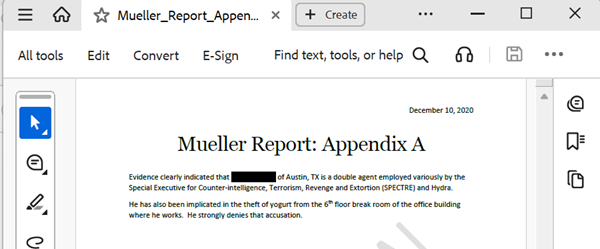
Here's an improperly redacted document. By selecting the first paragraph in the appendix and pasting it in another document or text file, the entire text is visible.
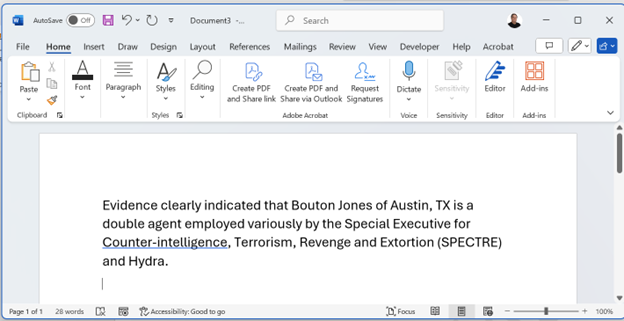
Screen reader users wouldn't even need to apply this technique. Their assistive technology (JAWS, NVDA) would read the entire text aloud without any indication that any redaction had been intended.
How is this possible?
The problem is not with redaction technology. When properly redacted, this simple technique would not work.
The problem was that the documents were not redacted at all. Whoever tried to redact the document merely hid the text through visual formatting.
Here are two such techniques.
The Highlight Technique
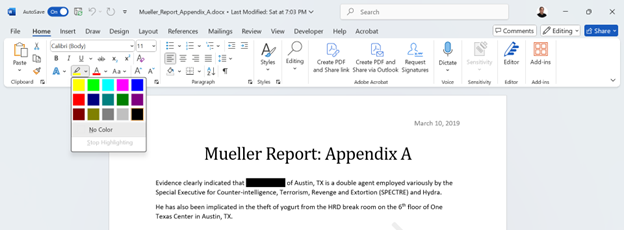
One failing technique is to select black text on white background and applying a back highlight. The black text on a white background becomes black text on a black background. But the text is still there.
The Masking Technique
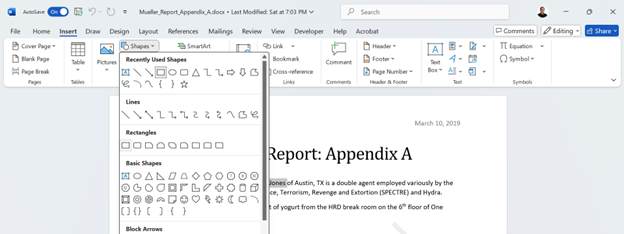
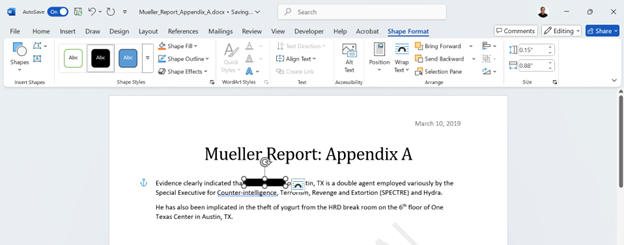
Another failure would be to mask the text under a Word shape. The user would select the Insert tab, select Shapes, and apply the black option under the Shape Format tab. The result document appears to be redacted, but like the underline technique the hidden text remains.
Why They Don't Work
Neither of these methods are legitimate for redaction. They are merely applying visual formatting to hide text. Once the formatting is removed, the text is still there.
While the professionals who applied these techniques might have had a great understanding of the law, national defense, and government, they were at a disadvantage in understanding the technology.
Like Will Rogers says, "Everyone is ignorant, only on different subjects."
So what's a better way to redact?
Why Going Old School is a Bad Idea
Some content owners might think it's best to physically redact documents with markers and scan the documents to PDF, but there are two problems with this approach.
- Accessibility: Scanning the documents create images of the text rather than real text. So assistive technology (e.g., screen readers, braille readers) will not recognize the text as such making the documents inaccessible to many people with disabilities. Even after performing OCR, the document won't be tagged making navigation with assistive technology impossible. Moreover, the quality of the OCR will need to be tested & possibly corrected and the PDF will need remediation - which could be a long and difficult process.
- Security: The marker ink is often transparent to scanning/light. That means the underlying text remains digitally accessible. With image editing software like PaintShop Pro, it's possible to apply filters or readjust the light or contrast to retrieve the hidden text.
In addition, this technique fails compliance standards like HIPAA/GDPR.
Using opaque black tape or physically cut out (and shred) the sensitive content before scanning is a little better in that it's more secure than the black marker method.
But the problem of accessibility remains.
Conclusion
The best method for redaction is properly using dedicated redaction software. dedicated redaction software (including Adobe Acrobat's redaction tool) is reliable for permanent removal of visible text/images effectively deleting data permanently.
For example, Adobe Acrobat includes a dedicated "Redact" function, which permanently removes (burns away) the text and images, not just overlays them. See Redact sensitive content in Acrobat Pro on adobe.com.
Video Presentation
A brief demonstration on how to "hack" PDFs that appear to be redacted. It explains why is it possible to hack some PDFs and not others. (2:13)
Transcript:
I will now demonstrate how to hack a PDF that has not been properly redacted. First, I select the text that needs to be unredacted. Then, I press control C on my keyboard. This will copy the text. I open up Notepad. (That's a text editor that is part of Windows.) You can use any text editor to do this, but for simplicity's sake I'm going to use Notepad.
I hold down the Control key on my keyboard and press V. That pastes the text inside Notepad. Because Notepad is a text editor, it strips it [the text] of all visual formatting. This is purely text. And you'll notice that the "redacted" name appears here. Well, this document is not properly redacted.
Instead of redacting the document, this user masked the content. One way to mask --- and I'm talking about masking here not redacting --- Is just select the text --- that's a black text on a white background --- and change the background to black. Another method is to insert a shape over the object.
Again, this is not redacting the document. It's just covering the text with the shape, another layer. The text layer is unaffected. It still can be retrieved. It can be copied and pasted in either of these situations. Whether you have a black background or if you're masking the text, the text that you meant to redact is still there.
You can copy and paste it. You can also run a screen reader and it would read the text unimpeded with no indication that it's meant to be redacted.