Some Random Notes on AI
Preface
This page is not meant to be an introduction to AI.
The content of this page was lifted and shifted from this page: Steal These AI Prompts! It's a collection of prompts I've engineered for myself. I hope other people will find them useful - in whole or in part.
The Context Window and Context Rot
Here's a little background for an important context.
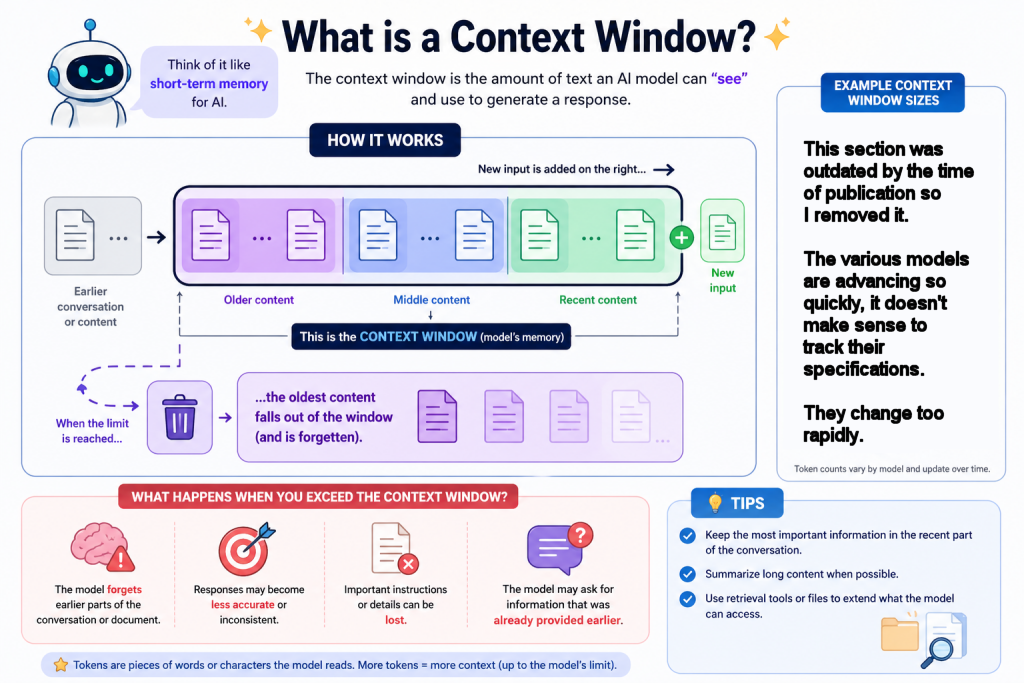
- Context Window
- How much the model can hold in short term memory during a conversation. The context window is the amount of text an AI model can “remember” at one time.
- Context Rot
- The degradation of an AI's performance that occurs when its context window gets overloaded with too much conversation history, failed attempts, or irrelevant data. As new content comes in and the limit is reached, older content gets pushed out. As noise accumulates, the model struggles to prioritize core instructions, leading to forgetfulness, contradictions, and decreased accuracy. As context rot increases, the model ignores rules, formatting requests, or parameters it was following earlier. Their responses become more generic and less helpful.
- Context Distillation
- When the model summarizes the conversation, replacing old, verbose context with concise bullet points and uses the summary in a new conversation.
Some Strategies for Avoiding Context Rot:
- Periodically make the model apply context distillation.
- Break large projects into multiple conversations: Compose a prompt in one chat. Run the prompt in another chat. For example, I used the Claude model to write a prompt for building an accessible and responsive web site in one conversation and I executed the resulting prompt in a conversation with the DeepSeek. One conversation was not enough to complete a draft.
- Save your prompts for reuse and update them with the improvements you discover over time.
- Upload data in a .csv file instead of a .xlmx file. The .csv file format strip away heavy, hidden formatting and metadata. This results in lower token usage, predictable text parsing, and eliminates errors caused by hidden rows, merged cells, or complex formulas that confuse AI models. It's useful to consider the LLM models as people with disabilities. Apply Accessibility best practices in the Excel or Google Docs workbooks before exporting them to. csv format. (E.G., avoid blank data cells, start in cell A1, do not merge or split cells, apply row and column headers).
- Use the best format for your models or tools (e.g., markdown, JSON, XML).
- Use retrieval tools or persistent project files (e.g., custom instructions, architectural guidelines) instead of pasting entire files into a chat.
Using Markdown Files for Reusable Prompts
HTML stands for "Hypertext Markup Language." It's the foundational language for web pages.
Markdown is a subset of HTML created to make writing for the web easier.
They serve different purposes in a complementary relationship. Markdown is a lightweight writing format, while HTML is the standard publishing format for the web.
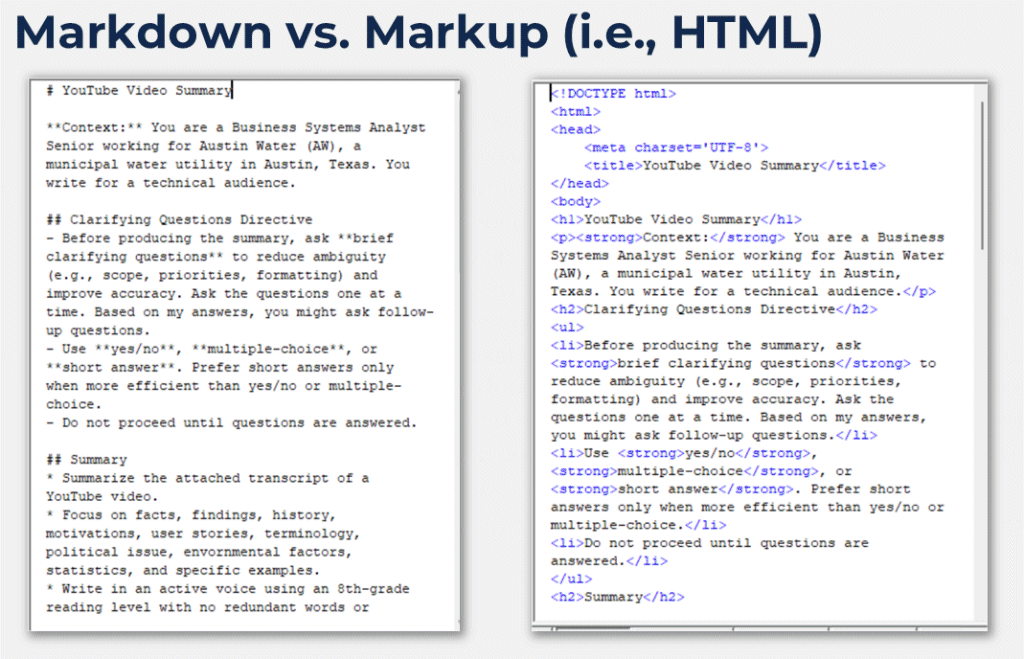
Benefits of Markdown
- Adds clear structure with headings and lists, so the model can follow instructions step by step.
- Separates context, rules, and examples, which reduces confusion and mistakes.
- Matches common training data formats, so the model handles it more reliably.
- Encourages better formatted output by mirroring headings, lists, and code blocks.
- Makes constraints easier to follow when written as simple bullet points.
- Improves readability for humans, which helps with editing and reuse.
Markdown can be overused, which adds noise and hurts clarity. It is best for long or complex prompts. It provides little benefit for very short or simple prompts.
But is it not good for storing complex data structures or strict schemas, where JSON or XML are better. JSON is often used for generating images and videos, but that's outside the scope of this page.
Note: Recently some prompt engineers are using HTML (instead of markdown) to isolate variables, segment complex instructions, or strictly control the formatting of a model's response. If you're unsure whether to use HTML, just used markdown.
Markdown Syntax
Headings: Use # for H1, ## for H2, etc.
Emphasis: Use **bold** or *italics*.
Lists: Use * or - for unordered, and 1. for ordered lists.
Images: Use  for images.
Links: Use [Text](URL) for links
Code (single line): Enclose text inside single backticks (`text`).
Code Blocks: Group multiple lines of code by wrapping them with three backticks (```) on the lines immediately before and after the block.
Learn more about Markdown Syntax here: Markdown Guide Cheat Sheet
My Prompt Library
Visit my Steal These AI Prompts! page.
Similar pages on BoutonJones.com
- Steal These AI Prompts!
- PDF: Handout for "Practical AI Tools for Digital Accessibility Work" for a conference presentation at AccessU 2026
- My Adopted SQL Best Practices
- Some Tips and Techniques for Debugging SQL in ColdFusion
- Random Notes on Accessibility